Mastering Prompt Engineering
A comprehensive guide to crafting improved inputs for Gemini, tailored for Hollywood Park's unique operational needs.
The Power of the Prompt
Generative AI, specifically the Gemini family of models, is built to function as a collaborative partner. In an organization where the guest journey begins long before arrival at the venue, the ability to process, summarize, and act upon information with speed and precision is critical.
Prompt engineering is the process of crafting requests that align the model’s vast computational power with your specific goals. Whether you are a guest experience representative or a technical project manager, mastering this skill unlocks a unified, intelligent operational layer for Hollywood Park.
Before You Prompt: The 3 Levers
Before you even write your first word, you can drastically change your outcome by adjusting three settings: Model (Brain), Tools (Capabilities), and Knowledge (Context). Using the right combination transforms Gemini from a simple chatbot into a specialized expert.
1. Model Selection (The "Brain")
This menu controls the intelligence level and latency. You are trading off speed for "reasoning".
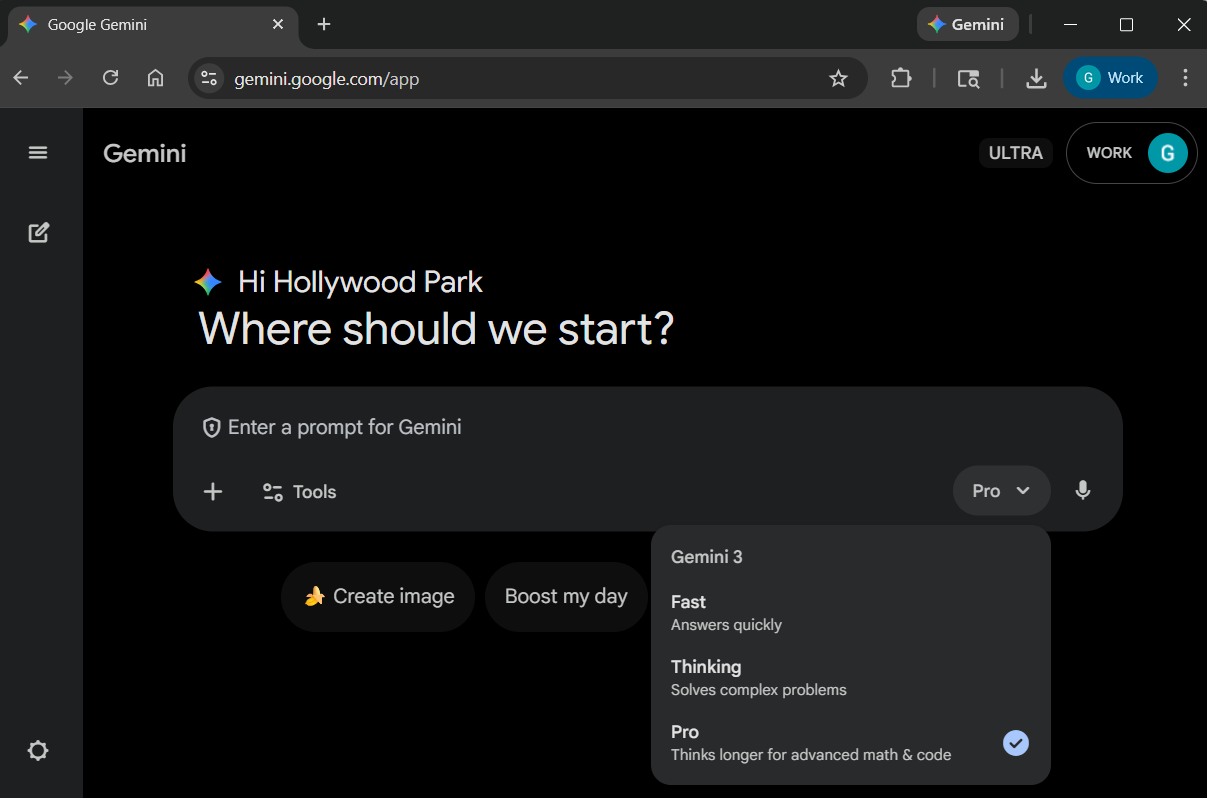
Fast (Gemini 3 Flash)
High Volume / Low Logic
Best for quick chats, simple summaries, or factual answers. Linearly processes info without pausing.
Thinking (Flash Thinking)
Brainstorming / Planning
Pauses to "reason" and plan. Excellent for logic puzzles, itineraries, or nuanced drafting.
Pro (Gemini 3 Pro)
Complex Analysis
The "heavyweight". Thinks deeply, exploring multiple angles. Handles massive context and intricate instructions.
2. Tool Selection (The "Capability")
Transforms Gemini from a chatbot into a specialized workstation.
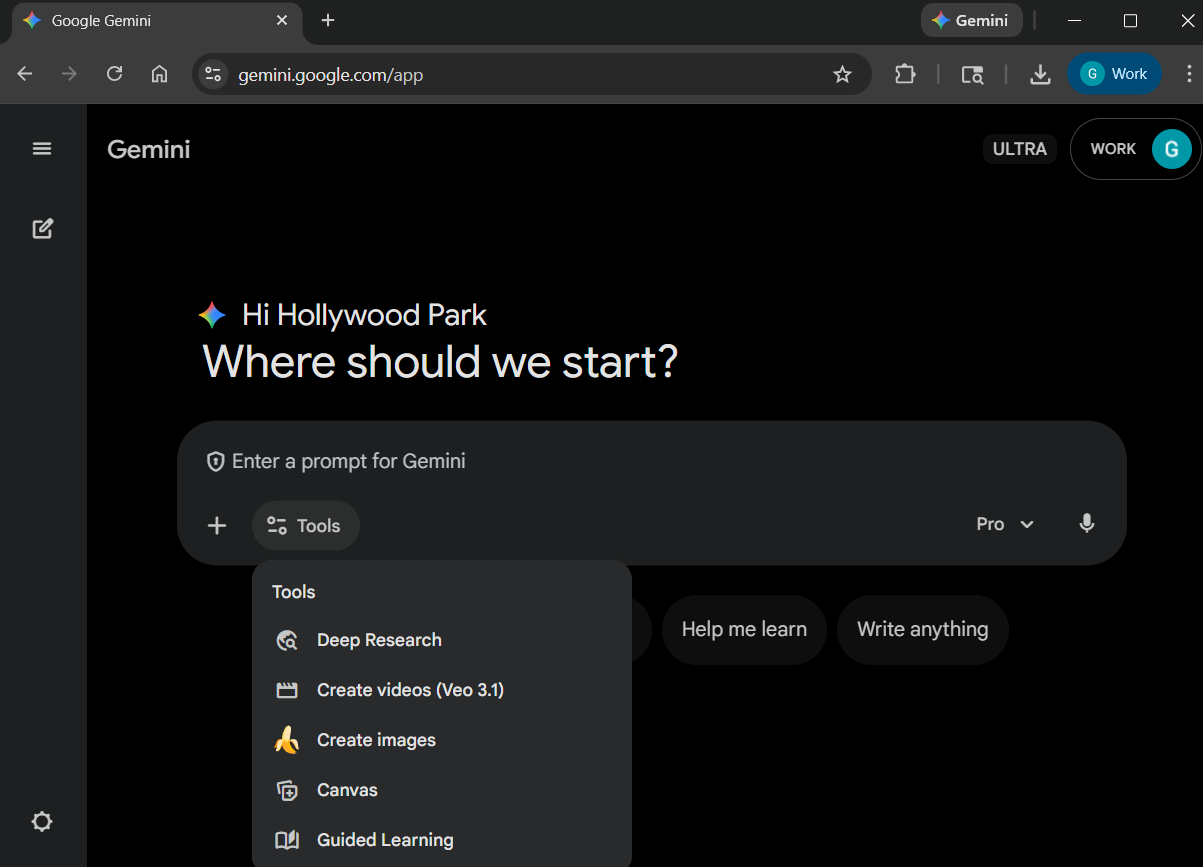
Autonomous agent that browses dozens of sites to synthesize a cited report.
Generates high-fidelity video clips from text or images.
Visuals engine for editing and creation.
Split-screen workspace for writing or coding. Targeted editing without re-generation.
Educational tutor persona that quizzes and guides you.
3. Knowledge Addition (The "Context")
Connects Gemini to your private data to eliminate generic responses.
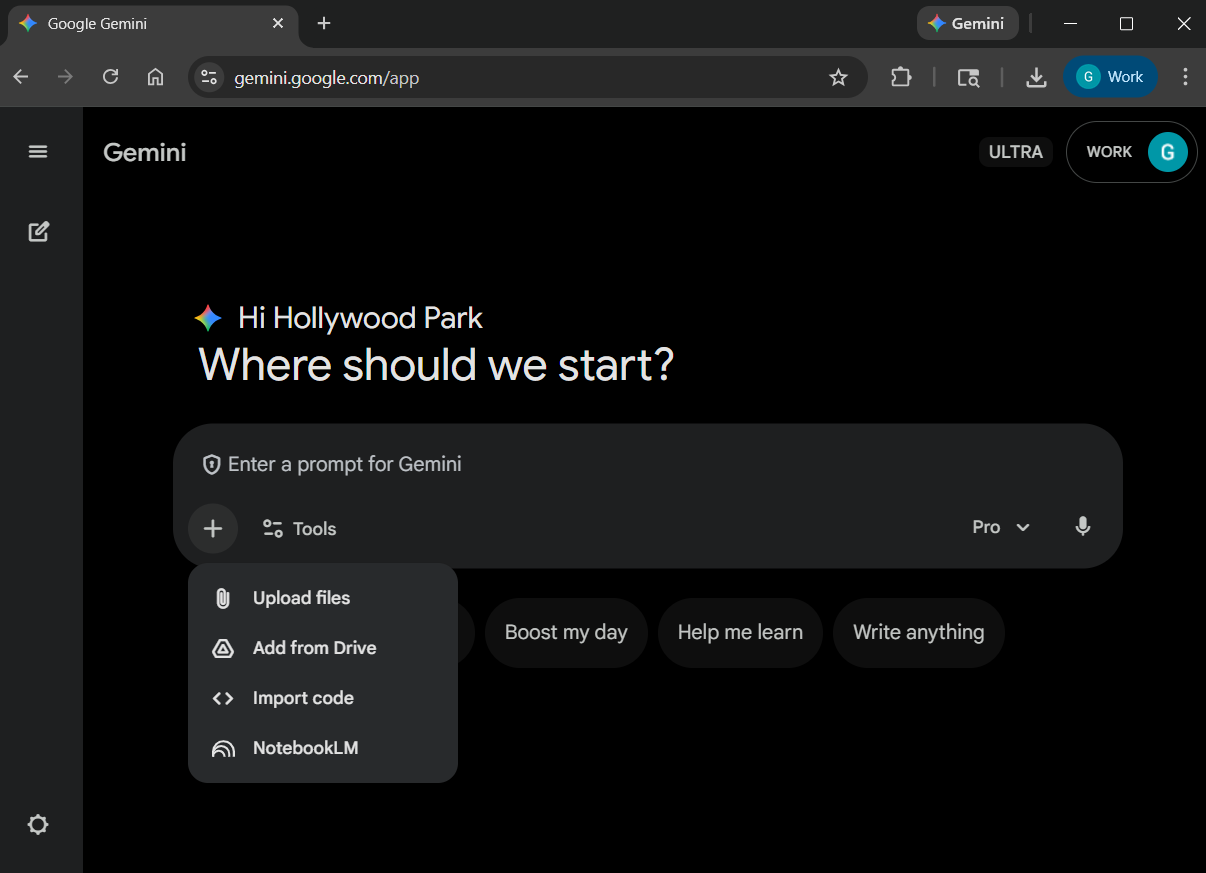
-
1
Upload Files
PDFs, CSVs, Images for immediate analysis.
-
2
Add from Drive
Connect live Docs, Sheets, and Slides. Essential for project-based drafting.
-
3
NotebookLM
Attach a curated "Notebook" of trusted sources to ground answers and eliminate hallucinations.
Overview: How to Choose
| If you want to... | Model | Tool | Knowledge |
|---|---|---|---|
| Fix a bug in code | Pro (Logic) | Canvas | Import Code |
| Write a blog post | Thinking (Creative) | Canvas | Add from Drive |
| Research a market | Pro or Thinking | Deep Research | NotebookLM |
| Quickly clear inbox | Fast | - | - |
| Clean messy data | Pro | Canvas | Upload Files (CSV) |
| Prepare for a meeting | Thinking | - | Add from Drive |
| Create storyboard | Fast | Create Images / Veo | - |
| Learn a new skill | Pro | Guided Learning | NotebookLM |
The Universal Framework (PTCF)
To move beyond generic outputs, adopt the Persona, Task, Context, and Format framework. This ensures the model understands not just what to do, but who it is acting as and why the task matters.
"You are an expert Guest Experience Leader."
"Draft a pre-shift briefing."
"High-profile concert, sold-out crowd."
"Three bullet points and one summary paragraph."
See the Difference
"Help me with the briefing."
"You are an expert Guest Experience Leader. Draft a pre-shift briefing for the Guest Experience team regarding tonight's sold-out concert. Reference our 'Start with Care' principle. Present as three bullet points for team priorities and one paragraph for safety reminders."
Advanced Techniques
Chain of Thought
"Show your work"
Forces the model to externalize its logic. Critical for calculations or complex reasoning.
Few-Shot Prompting
"Provide the blueprint"
Give the model 2-3 examples of the desired input/output format to establish a pattern.
Prompt Chaining
"Complex workflows"
Break a project into sequential steps where the output of one prompt becomes the context for the next.
Step 2: List risks based on summary.
Step 3: Draft email based on risks.
Power Tips for Workspace
The 21-Word Sweet Spot
Google research shows the most successful prompts average 21 words. Most users provide less than 9. Don't be afraid to be verbose; in many cases, longer prompts with more context yield significantly better results.
vs. "Draft an email to the team regarding the new attendance policy, highlighting the 3 key changes and using a supportive tone." (Just right)
Gemini as Editor
Use Gemini to improve your own prompts.
Workspace Integration
Use Gemini directly where you work. Don't forget to use the @ symbol to "ground" your AI in your specific files.
| App | Feature | Hollowood Park Use Case |
|---|---|---|
| Gmail | Help me write / Summarize | Summarize long vendor email threads to identify action items. |
| Docs | Refine / Draft | Generate press releases referencing mission statements in Drive. |
| Sheets | Organize / Classify | Categorize thousands of lines of guest feedback into buckets like "Wayfinding". |
| Drive | Side Panel Search | "Search across project folders to synthesize a status report." |
Role-Specific Strategies
Executive Leadership
Goal: Triage & Synthesis
Marketing & Brand
Goal: Creativity & Tone
Guest Experience
Goal: Rapid Information
Human Resources
Goal: Personalization
Sales & Outreach
Goal: Persuasion & Research
Customer Service
Goal: Empathy & Resolution
Project Management
Goal: Tracking & clarity
Coding & Debugging
Goal: Logic & Stability
Organizational Knowledge: Gems
The Prompt Generator Gem
Don't know where to start? Use this custom "Prompt Architect" to write your prompts for you.
Launch Prompt GeneratorComing Soon
We are creating a Deep Dive Training Module specifically for building and managing Gems. Stay tuned!
Looking for more pre-built Gems?
View Organization Gem LibraryFuture Frontier: 2026 & Beyond
Deep Research
Transforms a simple prompt into a multi-step, autonomous research plan. Perfect
for synthesizing Due Diligence packs or industry trend analysis.
Pro Tip: Ask for
a "research plan" first to review the methodology before execution.
Scheduled Actions
Put tasks on autopilot. Example: "Generate a weekly report on stadium electricity usage every Friday at 4:00 PM."
Ethical Guardrails & Accuracy
Warning: Hallucinations -> AI can sound confident but be factually incorrect.
Verification Strategy:
- Strict Grounding: Tell the model to "rely ONLY on the provided context."
- Verify Citations: Use NotebookLM or Deep Research specifically for their citation capabilities.
- Data Privacy: Your data in Workspace is YOUR data. It is never used to train public models.